Hiển thị các bài đăng có nhãn For Rooted. Hiển thị tất cả bài đăng

Thứ Năm, 9 tháng 2, 2012

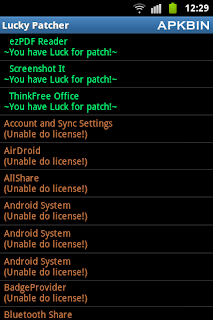
LuckyPatcher v1.0.3 Apk ( Root )

Free Android Mobiles APK

LuckyPatcher v1.0.3 Apk | 128 KB | Mediafire
Requires Android:1.6 and up | Root

LuckyPatcher iz a great tool to bypass Premium Applicationz License Verification. Now it can Remove some selected application more applicationz will add soon. To use thiz patcher you need a rooted devize.

v1.0.3 update:

Developed by ChelpuS

Download

Button Savior (Root) v1.3.2 Apk

Free Android Mobiles APK

Button Savior (Root) v1.3.2 Apk | 1.2 MB | Mediafire
Requires Android:1.5 and up

If you are afraid of breaking your hardware keys or you have broken keys or you simply just don't have any key on your device, get Button Savior to make your life easier.

v1.3.2 update:
- Fixed various issues induced from new feature Hide on click enabled.

This app will display a floating software key panel which can be summoned everywhere anytime.
For non root user: You can still user power off, Home, Camera, and Call keys.
[Features]
(1) Simulates 'Home' 'Back' 'Search' 'Back' 'Recent Task' 'Screen Off'
(2) Can set to always open or auto hide based on user
customizable timer
(3) Two types of trigger action to choose from
(4) Added Camera key and Call key simulation
(5) Customizable trigger position

IF YOU HAVE PROBLEM GRANTING ROOT FOR THIS APP
If your device is rooted and still cannot use keys except home, please update su binary and superuser apk.
IF YOU ARE UNABLE TO UNINSTALL
You need to disable screen off feature first. To disable, go to setting/location secuirty/device admin to remove Button Savior from the list.

Download

Download - Market

Thứ Tư, 8 tháng 2, 2012

Market Unlocker v3.2.5 Apk ( Root )

Free Android Mobiles APK

Market Unlocker v3.2.5 Apk | 676 KB | Mediafire
Requires Android:2.2 and up

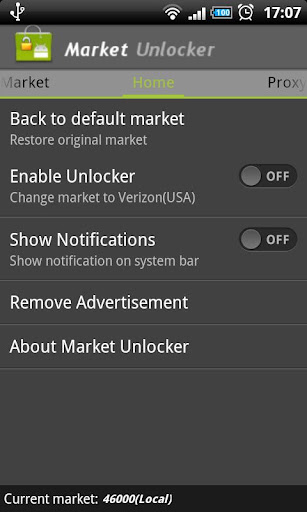
Market Unlocker lets you access paid or restricted apps in Android Market 2.x and 3.x and Amazon Appstore in one click. It's safe, stable, simple and free.

v3.2.5 update:
- Enhanced market detecting to reduce annonying notifications
- Removed background phone state service
- Improved configuring market process
- Improved to show active GSM operator instead of configured one

For some apps are just enabled for some specific countries and not available to the other countries,so it is very difficult to download many high quality software. Market Unlocker lets you access paid apps from countries where paid apps are not yet available.

Require:
***Get Root permission
***Have installed Android market
***Have installed Amazon appstore (optional)

Features:
***Change provider in one click
***Change provider automatically on boot or switch to flightmode
***Proxy support for market 3.x. It support HTTP, Socks4, Socks5 proxy and user authentication.
***Support Amazon Appstore outside USA.

It is not permanent, will be original after reboot or flight mode! So if you want to back to default market,just reboot or reset flight mode, but you can check "Auto Unlock" to fake it again automatically.

+++++ IMPORTANT UPDATE +++++
You can keep proxy disabled for your market 2.x, only check "Market Unlocker" to enable the function.

To work with new market 3.x,
1. Configure a USA (surely you can use other countries ip if they also support to show paid/restriced apps) proxy server and fill into market unlocker.
2. Enable proxy
3. Choose provider (optional. by default verizon is selected)
4. Check "Market Unlocker" to enable function.
That's all. Open Android market again, paid apps now are back to you. Good luck!

Download

ROM Toolbox Pro v4.5.0 Apk ( Root )

Free Android Mobiles APK

ROM Toolbox Pro v4.5.0 Apk | 2.9 MB | Mediafire
Requires Android:1.6 and up

ROM Toolbox is the MUST HAVE app for any rooted user. ROM Toolbox combines all the great root apps all tied up into one monster app with a beautiful and user-friendly interface.

v4.5.0 update:
Root Browser:
- Confirm popup when deleting files
- Home screen shortcuts for any folder
- Prompt to overwrite if file exists
- When zipping multiple files zip them into a 1 zip
- Attach files with other apps (like gmail)
- Add exit button
Other:
- German translations added
- Fix the screen cutting off in Term
- Voltage Control: Add support for more kernels
- Home shortcuts to run any command
- Fix google music fc w/ adblock (Please unblock and re-block ads)
- Boot delay preference

This app requires root permission. For fast and friendly support please email us at JRummy16@gmail.com . We will be glad to help answer your questions and troubleshoot with you.

Huge new update with must have features!

FEATURE LIST:
**************

==== TOOLS ====

– ROM Manager –
☆ Install full ROMs and other zips from a growing list of ROMs
☆ Create, manage and restore nandroid backups
☆ Wipe data, cache, dalvik-cache, battery stats
☆ Install a ROM from your SD card

– App Manager –
☆ Batch backup & restore
☆ Automatically backup apps when they are installed
☆ Automatically delete backups when uninstalled (off by default)
☆ Send backups via gmail/email or dropbox
☆ Sort backups by already installed, same as installed, older versions, etc.
☆ Backup/restore app data
☆ Backup/restore Android Market link
☆ Task manager
☆ View memory usage
☆ Show/hide different processes
☆ Automated batch uninstaller
☆ E-mail your apps to friends
☆ Share with other applications which accept text (SMS, facebook, google reader, etc…)
☆ Move *any* user app to the SD card
☆ Freeze/Defrost system & user apps
☆ Market Doctor (Link *any* app to the Android Market)
☆ Break market links
☆ Clean up dalvik-cache
☆ Zipalign all apks
☆ Fix permissions on all apps
☆ Wipe data or cache for apps
☆ Force close apps

– Root File Browser –
☆ Access the whole of android’s file system (including the elusive data folder!).
☆ Batch copy/paste, zip, tar, delete, move any file or folder
☆ Change file permissions and ownership
☆ View, edit and share files
☆ Add new files & folders in any directory

– Scripter –
☆ Create and run scripts as root
☆ Download & run new scripts from an ever-growing list

– Ad Blocker –
☆ Choose to block ads, porn, casino & risky sites
☆ Add new sites to the hosts file
☆ Use custom IP

– Configure Apps2SD –
☆ Select the default install location for apps

==== INTERFACE ====

– Font Installer –
☆ Install custom fonts to your whole device from a list of over 150
☆ Set fonts as favorites and send them to friends

– Boot Animation Installer –
☆ Install custom boot animations from over 100+
☆ Preview boot animations
☆ Backup & preview your current boot animation

– Battery Icon Changer –
☆ Change your battery icons in the status bar to a custom one from a list of 150+

– Boot Logo Changer –
☆ Change your boot logo (splash screen) for supported phones

– Theme Chooser Themes –
☆ View a list of themes for the CM7 theme chooser

==== PERFORMANCE ====

– CPU Sliders –
☆ SetCPU and scaling governor
☆ Apply cpu at boot
☆ View cpu info

– Build.prop Tweaks –
☆ Easily edit your build.prop
☆ Change lcd density, improve battery life, increase performance

– Auto Memomory Manager –
☆ Set minfree values and select from presets
☆ Apply minfree at boot

– SD Boost –
☆ Increase the speed of your SD card

– Sysctl Tweaks –
☆ Easily modify sysctl values

Download

Download - Market

Thứ Hai, 6 tháng 2, 2012

ROM Manager Premium v5.0.0.6 Apk ( Root )

Free Android Mobiles APK

ROM Manager Premium v5.0.0.6 Apk | 1.9 MB | Mediafire
Requires Android:1.6 and up

Must have app for any root user. Make backups, flash ROMs, and own your device.

v5.0.0.6 update:
- Fixed minor errors.

ATTENTION: I have started the rollout of ClockworkMod Recovery 5 for some devices. It will have faster tar backups, and will properly preserve the filesystem type at time of backup. If CWR5 fails to flash try flashing again, that usually fixes it (bad flash). If you have any issues with CWR5, feel free to roll back to the previous version, and report the bug to me at koush@clockworkmod.com!

ROM Manager is THE MUST HAVE APP for any Android root user. (Over 3 million downloads and counting!)

* Flash your recovery to the latest and greatest ClockworkMod recovery.
* Manage your ROMs via a handy UI.
* Organize and perform backups and restores from within Android!
* Install ROMs from your SD card.
* Install your favorite ROMs over the air!

Premium Version:
* Premium ROMs
* Receive notifications for when your ROM is updated!
* Automatic backups
* Install from QR Code
* Web Connect
* Support

Why does ROM Manager ask for account permissions?
Web Connect only needs to access your Google account to connect it to your google account. It can't access any private data or passwords.


Download

Download - Market

Thứ Năm, 2 tháng 2, 2012

LuckyPatcher v1.0.0 Apk

Free Android Mobiles APK

LuckyPatcher v1.0.0 Apk | 128 KB | Mediafire
Requires Android:1.6 and up | Root

LuckyPatcher iz a great tool to bypass Premium Applicationz License Verification. Now it can Remove some selected application more applicationz will add soon. To use thiz patcher you need a rooted devize.

v1.0.0 update:
1. Added support for TitaniumBackup, GoldenDict and another program with a Custom Patches.
Custom Patches - Patches for this specific program written by me or by anyone in the file format txt. (These files should be put in
the directory / sdcard / LuckyPatcher / - it is automatically created Lucky patcher and already has a few patches).
2. Program, which is custom patch in the folder / sdcard / LuckyPatcher / move to the top of the list and are marked in yellow.
3. In order to apply a custom patch to the program, you need long tapnut on it and select the menu "Custom patch apply!"
4. If the patch is run for all the inscriptions will be green, but in the end it will give greetings and perhaps instructions, it will depend on
person has made a custom patch.
5. If you press the "Add for patch on reboot!" on the program contains a custom patch, boot the device will use this custom patch,
rather than the standard rezalka license.
Developed by ChelpuS

Download

RAM Manager Pro v2.1.0 Apk

Free Android Mobiles APK

RAM Manager Pro v2.1.0 Apk | 124 KB | Mediafire
Requires Android:2.1 and up

This application was made for making RAM of all android phone to the best optimization.This application improves perfomance of your phone in all directions. Switching between applications is very fast, your system will be smoothness as never before. You can fully use your multitasking and you still have as much memory as you need.

v2.1.0 update:
- Improved UI
- Added battery charging limit
- Added "Non-killable launcher" option to "Hard Multitasking" option

FEATURES:
-Balance - Option which makes your RAM to the best optimization, this option is for everyday using when you use your phone for the most functions and you want have fast phone without lags.
-Balance (with more free memory) - This option is on the same base as balance, but this option should be advantageous for users who have less RAM than 512 MB. This option makes your RAM to the best optimization with more free memory but with a bit less multitasking.
-Balance (with more multitasking) - This option is on the same base as balance, but this option should be advantageous for users who have more RAM than 512 MB. This option gives you more multitasking.
-Hard Gaming - Option which stabilizes your RAM for playing the hardest games. Use this option for games which lags on your phone. Your games will be smoothness and without lags.
-Hard Multitasking - Option for users which are really hard working on their phones. You can have a lot of running apps with fast switching between them and without lags.
-Default (Samsung) - Default settings by Samsung, this settings also use phones as LG, HTC, etc.
-Default (Nexus S) - Default settings which use all Google phone.
-Default settings of your phone - This option reverts your RAM to your default settings, which you had before you install this app.
-All Balance options include additional option "Non-killable launcher".
-Chosen option is automatically set on each reboot.
-You can easily switch between all options without rebooting.

Download

Download - Market

Root Explorer (File Manager) 2.18 Apk

Free Android Mobiles APK

Root Explorer (File Manager) 2.18 Apk | 273 KB | Mediafire
Requires Android:1.1 and up

Root Explorer is the ultimate file manager for root users. Access the whole of android's file system (including the elusive data folder!).

v2.18 update:
- Added German and Spanish language support.

Features include SQLite database viewer, Text Editor, create and extract zip or tar/gzip files, extract rar archives, multi-select, execute scripts, search, remount, permissions, bookmarks, send files (via email, bluetooth etc), image thumbnails, APK binary XML viewer, change file owner/group, create symbolic link, "Open With" facility, MD5.

For fast, friendly support simply email us: support@speedsoftware.co.uk

We will always try to help with any problem you may have with the app. If we can't help then you can have a refund, no questions asked.

Although 10,000+ five star ratings will tell you that most people are very satisfied customers. Make sure you read as many comments as possible to get a good idea of what most people think of the app.

We still respect the old 24 hour refund policy. So if you're not happy with the app just email us within 24 hours and you can have a refund. We'll need to know the order number, which you can find on the emails sent to you by Google when you downloaded.

Download

Download - Market

ROM Manager Premium v5.0.0.3 Apk

Free Android Mobiles APK

ROM Manager Premium v5.0.0.3 Apk | 1.9 MB | Mediafire
Requires Android:1.6 and up

Must have app for any root user. Make backups, flash ROMs, and own your device.

v5.0.0.3 update:
- Fixed billing errors.

ATTENTION: I have started the rollout of ClockworkMod Recovery 5 for some devices. It will have faster tar backups, and will properly preserve the filesystem type at time of backup. If CWR5 fails to flash try flashing again, that usually fixes it (bad flash). If you have any issues with CWR5, feel free to roll back to the previous version, and report the bug to me at koush@clockworkmod.com!

ROM Manager is THE MUST HAVE APP for any Android root user. (Over 3 million downloads and counting!)

* Flash your recovery to the latest and greatest ClockworkMod recovery.
* Manage your ROMs via a handy UI.
* Organize and perform backups and restores from within Android!
* Install ROMs from your SD card.
* Install your favorite ROMs over the air!

Premium Version:
* Premium ROMs
* Receive notifications for when your ROM is updated!
* Automatic backups
* Install from QR Code
* Web Connect
* Support

Why does ROM Manager ask for account permissions?
Web Connect only needs to access your Google account to connect it to your google account. It can't access any private data or passwords.


Download

Download - Market

Thứ Ba, 31 tháng 1, 2012

ROM Manager Premium v5.0.0.1 Apk

Free Android Mobiles APK

ROM Manager Premium v5.0.0.1 Apk | 1.9 MB | Mediafire
Requires Android:1.6 and up

Must have app for any root user. Make backups, flash ROMs, and own your device.

v5.0.0.1 update:
- ClockworkMod Touch Recoveries have been added to ROM Manager for select devices. Touch recoveries are FREE downloads on the ClockworkMod website, or as an in app purchase within ROM Manager. Your support is appreciated! This is beta, so report bugs!

ATTENTION: I have started the rollout of ClockworkMod Recovery 5 for some devices. It will have faster tar backups, and will properly preserve the filesystem type at time of backup. If CWR5 fails to flash try flashing again, that usually fixes it (bad flash). If you have any issues with CWR5, feel free to roll back to the previous version, and report the bug to me at koush@clockworkmod.com!

ROM Manager is THE MUST HAVE APP for any Android root user. (Over 3 million downloads and counting!)

* Flash your recovery to the latest and greatest ClockworkMod recovery.
* Manage your ROMs via a handy UI.
* Organize and perform backups and restores from within Android!
* Install ROMs from your SD card.
* Install your favorite ROMs over the air!

Premium Version:
* Premium ROMs
* Receive notifications for when your ROM is updated!
* Automatic backups
* Install from QR Code
* Web Connect
* Support

Why does ROM Manager ask for account permissions?
Web Connect only needs to access your Google account to connect it to your google account. It can't access any private data or passwords.


Download Or Download

Download - Market

Chủ Nhật, 29 tháng 1, 2012

ROM Manager Premium v4.8.1.5 Apk

Free Android Mobiles APK

ROM Manager Premium v4.8.1.5 Apk | 1.9 MB | Mediafire
Requires Android:1.6 and up

Must have app for any root user. Make backups, flash ROMs, and own your device.

v4.8.1.5 update:
- Improve device detection by checking ro.product.device.

ATTENTION: I have started the rollout of ClockworkMod Recovery 5 for some devices. It will have faster tar backups, and will properly preserve the filesystem type at time of backup. If CWR5 fails to flash try flashing again, that usually fixes it (bad flash). If you have any issues with CWR5, feel free to roll back to the previous version, and report the bug to me at koush@clockworkmod.com!

ROM Manager is THE MUST HAVE APP for any Android root user. (Over 3 million downloads and counting!)

* Flash your recovery to the latest and greatest ClockworkMod recovery.
* Manage your ROMs via a handy UI.
* Organize and perform backups and restores from within Android!
* Install ROMs from your SD card.
* Install your favorite ROMs over the air!

Premium Version:
* Premium ROMs
* Receive notifications for when your ROM is updated!
* Automatic backups
* Install from QR Code
* Web Connect
* Support

Why does ROM Manager ask for account permissions?
Web Connect only needs to access your Google account to connect it to your google account. It can't access any private data or passwords.


Download

Download - Market

Thứ Sáu, 27 tháng 1, 2012

NoBloat v1.2.2 Apk

Free Android Mobiles APK

NoBloat v1.2.2 Apk | 167 KB | Mediafire
Requires Android:1.6 and up

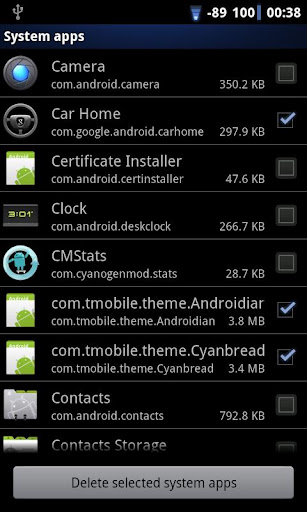
NoBloat lets you delete unwanted apps that come pre-installed with your phone. Simply select the bloatware that you want to get rid of and click delete. By default, NoBloat will automatically place backups on your external storage which you can restore at any time.

v1.2.2 update:
- Fixed issue where SU would no longer be recognised.

Using the blacklist in the full version, you can swiftly get rid of all bloatware after installing a new ROM. When wiping your phone's data, you can export your blacklist to import it on your new ROM.
You're advised to try the free version before buying. Not all ROMs allow NoBloat to work.

Free version features
* Disabling and enabling system apps
* Creating backups of system apps and restoring them
* Deleting system apps

Full version features
* Creating a blacklist of system app to delete
* Batch operation to backup/remove all blacklisted system apps
* Batch operation to enable all disabled system apps
* Batch operation to restore all backups
* Export your settings and blacklist to external storage to import them later
* Quickly find apps using the search functionality

Notes
* In order to use NoBloat you need root access and busybox. If you do not know what root access means, you probably don't have it.
* If you have issues uninstalling apps, try uninstalling the app's updates or enabling USB debugging.
* Be aware that in order to update your version of Android, you might need all original apps in place. It is advised to always have a backup of deleted apps or to just disable them so you can restore them later.

Download Or Download

Download - Market

Thứ Năm, 26 tháng 1, 2012

LuckyPatcher v0.9.0 Apk

Free Android Mobiles APK

LuckyPatcher v0.9.0 Apk | 128 KB | Mediafire
Requires Android:1.6 and up | Root

LuckyPatcher iz a great tool to bypass Premium Applicationz License Verification. Now it can Remove some selected application more applicationz will add soon. To use thiz patcher you need a rooted devize.

v0.9.0 update:
- Completely reworked About.
- Now there is more information about the program;
- Posted BootList - a list of programs that will re-patch for zagruzhke device to at least flew registration;
- Violet now spot programs that are in BootList;
- To add a program to BootList long press on it and select "Add for patch on reboot";
- To remove a program from BootList should press settings and choose "Boot Patches List", click there on the program you remove it from the list (a great number of programs can make BootList inhibit your device at boot time);
- Added a new directory in the processing / cache / dalvik-cache / ... Now the program will work and the people who moved here dalvik-cache.

Developed by ChelpuS

Download

Thứ Hai, 23 tháng 1, 2012

Titanium Backup PRO v4.7.5 Full Apk + TBPatcher

Free Android Mobiles APK

Titanium Backup PRO v4.7.5 Full Apk + TBPatcher | 1.5 MB | Mediafire
Requires Android:1.0 and up

The ONLY tool that can backup, restore, freeze (with Pro) your apps + data + Market links! Even protected apps! 0-click Batch/scheduled backups! PRO version has 0-click batch restores, Dropbox sync, Dalvik cleaner & MORE!

v4.7.5 update:
1. • Added the ability to export & import custom labels (ie: app lists) directly to/from the clipboard.
2. • Added an option to "follow all symbolic links" during app data backups. This allows TB to work on ROMs that use a tweaked data layout (eg: recent ROMs for the original Samsung Galaxy S).
3. • Fixed a bug where the ChangeLog could reappear (even if settings are being synced) after wiping data.
4. • Big translation updates.

PRO Features:
• Multiple backups per app
• 0-click batch restore
• Encryption
• Batch verification
• Hypershell speed
• Market Doctor
• Apps freezer
• Unlimited schedules
• Sync to/from Dropbox
• Brand the app with your name
• NEW: Bloatware Melter (experimental)

Instructions:
1. install Titanium Backup and don't run.
2. install TBPatcher
3. Press "Press for Activate"
4. Done

Download

Download - Market

ROM Manager Premium v4.8.1.4 Apk

Free Android Mobiles APK

ROM Manager Premium v4.8.1.4 Apk | 1.9 MB | Mediafire | MS
Requires Android:1.6 and up

Must have app for any root user. Make backups, flash ROMs, and own your device.

v4.8.1.4 update:
- Remove Pontiflex ad network. It was causing excessive startup times. (Less ads!)

ATTENTION: I have started the rollout of ClockworkMod Recovery 5 for some devices. It will have faster tar backups, and will properly preserve the filesystem type at time of backup. If CWR5 fails to flash try flashing again, that usually fixes it (bad flash). If you have any issues with CWR5, feel free to roll back to the previous version, and report the bug to me at koush@clockworkmod.com!

ROM Manager is THE MUST HAVE APP for any Android root user. (Over 3 million downloads and counting!)

* Flash your recovery to the latest and greatest ClockworkMod recovery.
* Manage your ROMs via a handy UI.
* Organize and perform backups and restores from within Android!
* Install ROMs from your SD card.
* Install your favorite ROMs over the air!

Premium Version:
* Premium ROMs
* Receive notifications for when your ROM is updated!
* Automatic backups
* Install from QR Code
* Web Connect
* Support

Why does ROM Manager ask for account permissions?
Web Connect only needs to access your Google account to connect it to your google account. It can't access any private data or passwords.


Download Or Download

Download - Market

Thứ Năm, 19 tháng 1, 2012

Mobile ODIN Pro v1.30 Apk ( Root )

Free Android Mobiles APK

Mobile ODIN Pro v1.30 Apk ( Root ) | 252 KB | Mediafire
Requires Android:2.2 and up

Mobile ODIN is the on-device firmware flasher of choice. Just throw those firmware files on your (internal or external) SD card, start Mobile ODIN and flash away.

v1.30 update:
# Fixed: Theme
# Fixed: Strange characters in file paths
# Added: Additional file accessability checks
# EverRoot: Fixed some situations where it failed
# EverRoot: Storage warnings added
# FlashKernel: Backed up to SD card instead of /system
# Dump: Various partition information added

!!! Your device must be rooted to be able to use Mobile ODIN !!!

If you use the EverRoot option, Mobile ODIN will root the firmware while you flash it. Checking out that new leaked firmware? No reason to lose root!

Currently supported devices:

- Samsung Galaxy S GT-I9000
- Samsung Galaxy S GT-I9000B *NEW v1.20*
- Samsung Galaxy S GT-I9000M *NEW v1.20*
- Samsung Galaxy S GT-I9003 *NEW v1.20*
- Rogers Captivate SGH-I896 *NEW v1.20*
- AT&T Captivate SGH-I897 *NEW v1.20*
- Samsung Galaxy Tab 7" GT-P1000
- Samsung Galaxy S2 GT-I9100
- Samsung Galaxy S2 GT-I9100T *NEW v1.20*
- AT&T Galaxy S2 SGH-I777 *NEW v1.20*
- Sprint Epic 4G Touch SPH-D710 *NEW v1.20*
- Samsung Galaxy Note GT-N7000

More devices to come!

Download Or Download

Download - Market

Thứ Hai, 16 tháng 1, 2012

ROM Manager Premium v4.8.1.3 Apk + Key

Free Android Mobiles APK

ROM Manager Premium v4.8.1.3 Apk + Key | 1.9 MB | Mediafire | FS
Requires Android:1.6 and up

Must have app for any root user. Make backups, flash ROMs, and own your device.

v4.8.1.3 update:
- Fix another a zip install bug on /data/media devices.

ATTENTION: I have started the rollout of ClockworkMod Recovery 5 for some devices. It will have faster tar backups, and will properly preserve the filesystem type at time of backup. If CWR5 fails to flash try flashing again, that usually fixes it (bad flash). If you have any issues with CWR5, feel free to roll back to the previous version, and report the bug to me at koush@clockworkmod.com!

ROM Manager is THE MUST HAVE APP for any Android root user. (Over 3 million downloads and counting!)

* Flash your recovery to the latest and greatest ClockworkMod recovery.
* Manage your ROMs via a handy UI.
* Organize and perform backups and restores from within Android!
* Install ROMs from your SD card.
* Install your favorite ROMs over the air!

Premium Version:
* Premium ROMs
* Receive notifications for when your ROM is updated!
* Automatic backups
* Install from QR Code
* Web Connect
* Support

Why does ROM Manager ask for account permissions?
Web Connect only needs to access your Google account to connect it to your google account. It can't access any private data or passwords.


Download Or Download

Download - Market

Thứ Bảy, 14 tháng 1, 2012

LuckyPatcher v0.8.1 Apk

Free Android Mobiles APK

LuckyPatcher v0.8.1 Apk | 128 KB | Mediafire
Requires Android:1.6 and up | Root

LuckyPatcher iz a great tool to bypass Premium Applicationz License Verification. Now it can Remove some selected application more applicationz will add soon. To use thiz patcher you need a rooted devize.

v0.8.1 update:
1. Redesigned search algorithm, as old managed to miss the correct sequence
2. Changed the signature once again.
3. Now support with Android version 1.6

Developed by ChelpuS

Download

Thứ Sáu, 13 tháng 1, 2012

ROM Manager Premium v4.8.1.2 Apk + Key

Free Android Mobiles APK

ROM Manager Premium v4.8.1.2 Apk + Key | 1.9 MB | Mediafire | Multiupload
Requires Android:1.6 and up

Must have app for any root user. Make backups, flash ROMs, and own your device.

v4.8.1.2 update:
- Increase image download performance.
- Fix links.

ATTENTION: I have started the rollout of ClockworkMod Recovery 5 for some devices. It will have faster tar backups, and will properly preserve the filesystem type at time of backup. If CWR5 fails to flash try flashing again, that usually fixes it (bad flash). If you have any issues with CWR5, feel free to roll back to the previous version, and report the bug to me at koush@clockworkmod.com!

ROM Manager is THE MUST HAVE APP for any Android root user. (Over 3 million downloads and counting!)

* Flash your recovery to the latest and greatest ClockworkMod recovery.
* Manage your ROMs via a handy UI.
* Organize and perform backups and restores from within Android!
* Install ROMs from your SD card.
* Install your favorite ROMs over the air!

Premium Version:
* Premium ROMs
* Receive notifications for when your ROM is updated!
* Automatic backups
* Install from QR Code
* Web Connect
* Support

Why does ROM Manager ask for account permissions?
Web Connect only needs to access your Google account to connect it to your google account. It can't access any private data or passwords.


Download Or Download

Download - Market

Copy Paste It v4.06 Apk

Free Android Mobiles APK

Copy Paste It v4.06 Apk | 1.9 MB | Mediafire | Multiupload
Requires Android:1.5 and up

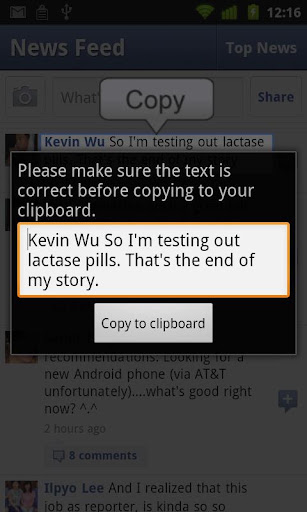
*May require a rooted phone (depends on phone)* Copy text from ANY screen to your clipboard. Then, paste it into any text box by long-pressing on it.

v4.06 update:
- Works on Android 4.0 devices

Use this to have copy paste functionality from ANY app or screen!

- Copy text to clipboard using on-board or networked OCR recognition.
- Copy to clipboard by shaking phone.
- Copy to clppboard by long-pressing on search button.
- Copy to clipboard by pressing overlay button.
- Support for many different languages.

NOTE: If this version does not work because your phone is not rooted

Download Or Download

Download - Market